Auto-Focus
Detects Focus.
Disables Notifications.
Auto-Focus watches the apps and sites you choose and turns on Do Not Disturb when you've settled into work. No timers. No manual toggling. No activity data leaves your Mac.
Open source. Local-first. No activity data leaves your Mac. Inspect the code on GitHub.



Focus tools shouldn't need babysitting
Timers, manual DND, and scheduled focus modes all depend on you remembering to flip a switch. Auto-Focus flips the model: when you've actually been working for long enough, it protects that time automatically.
You start working
Open VS Code, review a PR, design in Figma, or settle into a writing app.
It watches for your focus setup
Choose the apps and browser URLs that count as focus. Matching happens locally on your Mac.
Do Not Disturb turns on
Stay there for 12 minutes and Auto-Focus enables Do Not Disturb for you. No timer to start. No toggle to remember.
Notifications come back
Leave your focus apps and Auto-Focus restores notifications after a short buffer. Quiet when you need it, normal when you don't.
Built for the work you already do
Coding sessions
Keep Slack, Messages, and the rest of Notification Center quiet while you stay in VS Code, Xcode, Cursor, or your editor of choice.
Pull request reviews
Treat GitHub review time like real focus time instead of letting it turn into inbox triage halfway through.
Design work
Protect long Figma sessions without starting a timer first. Open the tool, get into the work, and let Auto-Focus handle the rest.
Browser-heavy workflows
Match focus on GitHub, Linear, Notion, docs, and other domains you choose. No browser extension needed.
What it is not
-
✗
Not a timer app. No Pomodoro cycles. No sessions to start. No clock to babysit.
-
✗
Not a productivity score. No streaks, leaderboards, or guilt dashboards.
-
✗
Not a distraction blocker. It doesn't block apps or websites. It just silences notifications at the right time.
-
✗
Not cloud-based. Your activity data stays on your Mac. License validation and update checks are the only app network requests.
Private enough to inspect
Auto-Focus asks for sensitive macOS permissions, so the code is public. You should be able to verify what is monitored, what stays local, and what network requests the app actually makes.
Open source
The macOS app source is public, including app monitoring, browser matching, licensing, and update checks.
View source →Local-first
Focus sessions, app activity, browser URL matching, settings, and insights are stored locally on your Mac.
Explicit network use
Auto-Focus only contacts the server to validate Plus licenses and check whether a new version is available.
| Data | Where it goes |
|---|---|
| Focus sessions, active apps, settings, insights | Stored locally on your Mac |
| Active browser URL data used for focus matching | Read and stored locally, not uploaded |
| License key and app version | Sent only for Plus license validation |
| Update checks | Fetches the latest version file, no activity data included |
Small enough to stay out of your way
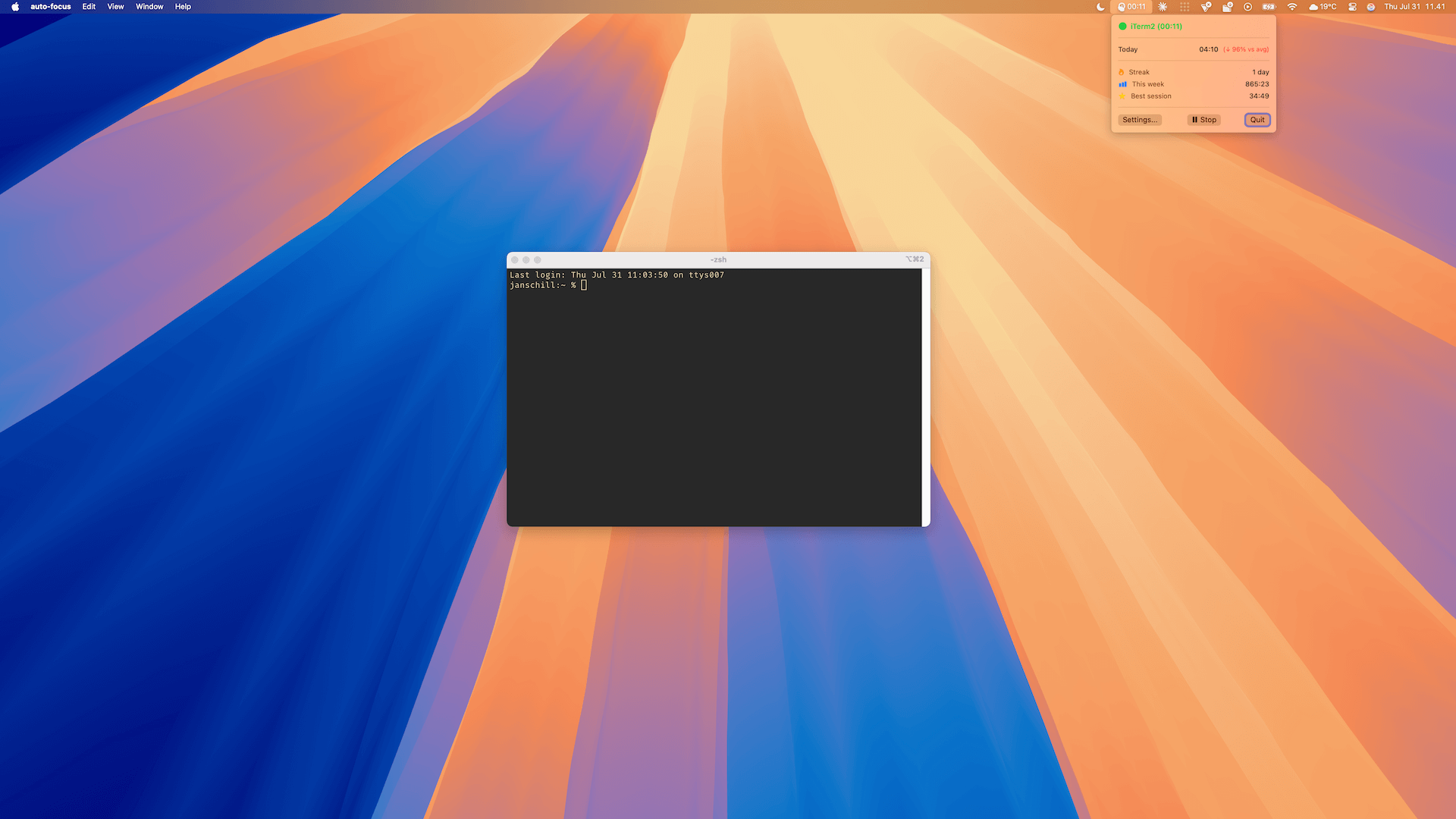
A simple menu bar view shows whether focus protection is active, without turning into another dashboard to manage.
One-time purchase. Lifetime focus.
Start free, then upgrade when you want Auto-Focus on every app and browser workflow that matters to you.
Free
$0
- ✓ Automatic Do Not Disturb
- ✓ 2 focus apps
- ✓ Basic insights
- ✓ Browser URL matching
- ✓ Data export & import
Plus
$9
One-time. Lifetime.
- ✓ Everything in Free
- ✓ Unlimited focus apps
- ✓ Unlimited browser URLs
- ✓ Advanced analytics
- ✓ Future updates
Secure Stripe checkout opens only when you choose to buy.
Works with your browser too
Auto-Focus can match your active browser tab against the domains you choose for focus, so web apps like GitHub, Linear, Figma, and Notion count too — no extension needed. It works with Safari, Chrome, Brave, Edge, Arc, and more. Just grant Automation permission and add your focus URLs.
FAQ
Does it track my activity?
No. Focus sessions, app activity, and browser URL matching stay on your Mac. Plus only contacts the server for license validation and update checks.
Can I choose what counts as focus?
Yes. You choose the apps and browser URLs that should trigger focus protection, then let Auto-Focus watch for them locally.
Will it block websites or apps?
No. Auto-Focus only controls Do Not Disturb. It silences notifications; it does not block tools or restrict your browsing.
Does it work with browser-based tools?
Yes. It can match your active browser tab against the domains you choose in Safari, Chrome, Brave, Edge, Arc, and other Chromium-based browsers.